Showing posts with label Ed Puzzle. Show all posts

Friday, 22 April 2016

Friday's News

Another week has come and gone and in an instant you feel like you can see the light at the end of the tunnel or the finish line of this long race we call school.

It's been a fun and fast week with lots of things coming at us.

Personally, our house is very excited for the addition of our new puppy Bailey who will be coming home in another two weeks. He is an English Bulldog.
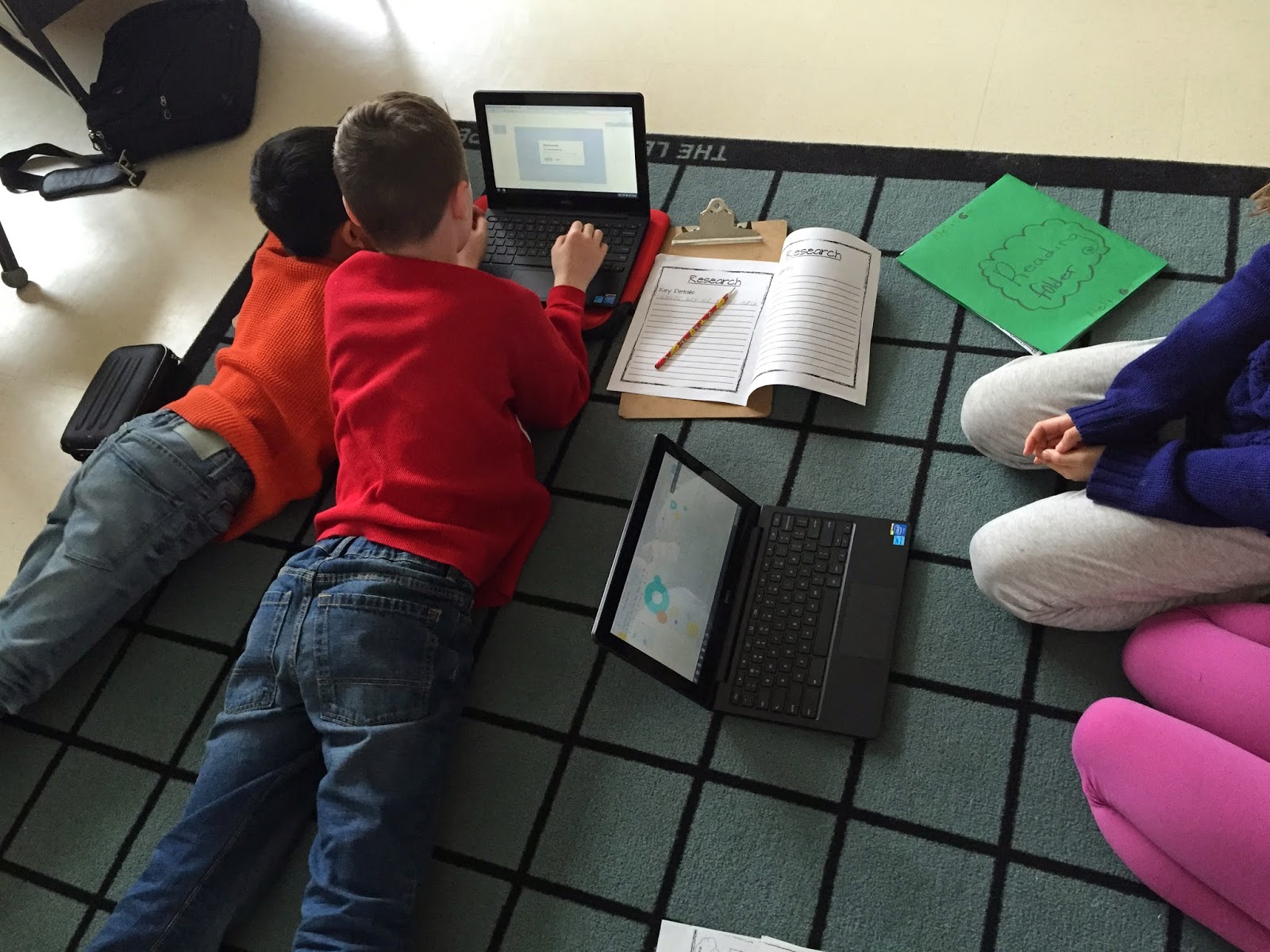
In the classroom Jeff has been testing out a great app for use with Google Apps for Education. It's called Kaizena. Kids can record things like reading, jot notes, and respond to feedback orally as well as written. Here are some kids using the app. 


Jeff was also using his other favourite app Ed Puzzle has his students are starting to learn about gears. 

How did your week turnout? Let us know. 


Wednesday, 5 August 2015

Teach Me How To EDpuzzle

Yesterday, we talked about a great site and teaching tool called EDpuzzle. If you remember or don't remember EDpuzzle is a video site where you can add a class and have video content on there to engage your students in a different way of learning. Or as the fine folks over at EDpuzzle like to call it gaining super powers sort of like the video game character below.


Today, we are going to show you how easy it is to use EDpuzzle. Hopefully, it will show how easy this tool can be to use and also maybe inspire you to give it a shot. 
On
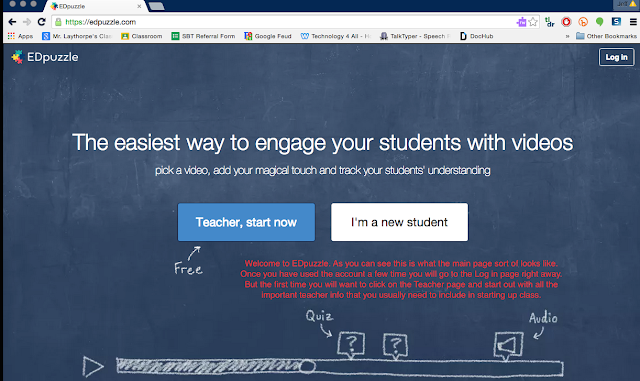
This is of course the first page you will see when you click on EDpuzzle for the first time. Pretty self explanatory here. As a teacher signing up for the first time you will click on the Teacher box. This will then take you to a screen that will ask you to put in your key details. You know the basic credentials like teacher name, email, etc. For your students they would follow the student login in. However, before you have them sign in you will need a course code so make sure you fill out your account info first and set up a classroom.

This is what your students will see when they click on the student page. 

Again this is more info your students will see when they click on the new student page. 

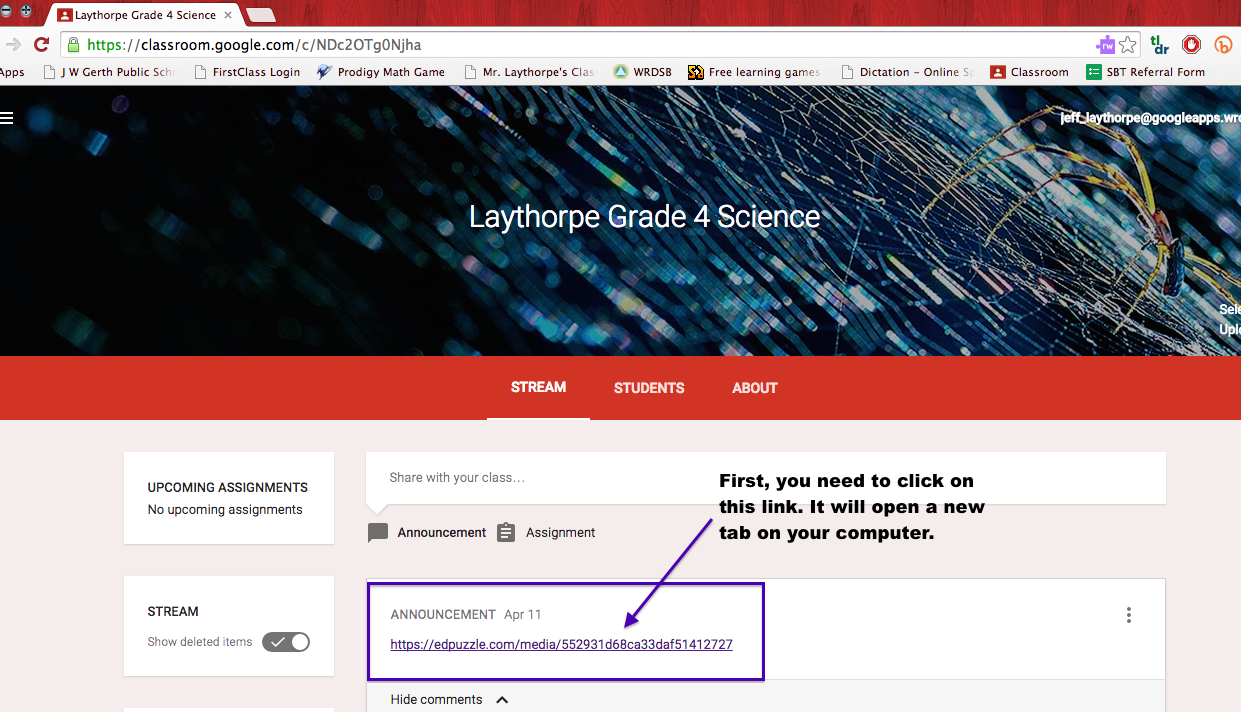
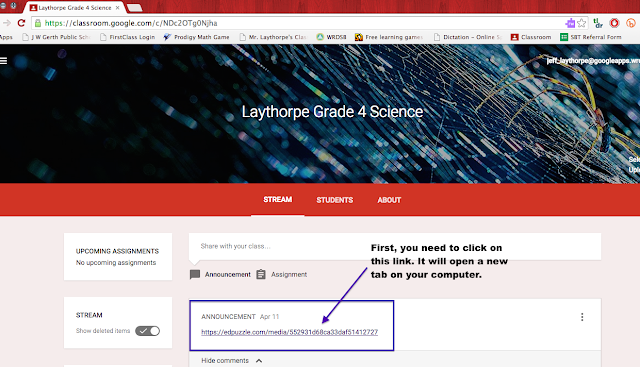
Now one suggestion if you are comfortable with tech and you use Google Classroom you can put the link to EDpuzzle and your videos up on Google Classroom as an announcement. This way your students can see the link instantly it directs them right to the video. Of course, you would need to be setup on Google Classroom or whatever other tech site you might use to connect with your students. This is a shot from my previous grade 4 science class just to show you what that might look like. 
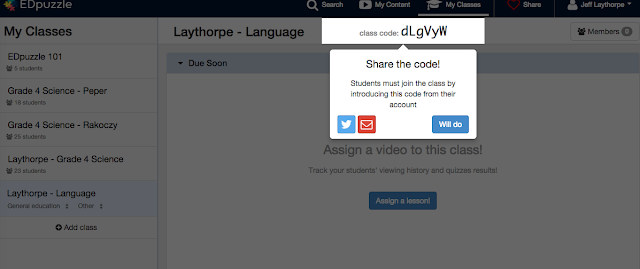
When you enter in all your info and create a class EDpuzzle will give you a class code right away. As you can see in the picture below. Your students will need that code to enter the classroom and access the videos in that particular class. For me I had three different science classes so you can see my classes are broken up into sections. You of course do not need to do so. It was just easier for organization purposes. With the class code be sure to share this with class. Again it can be done whatever way you want. I put it up on the white board for students to record into their planners and they entered it when they got home. Other classes I posted it in our on our Google Classroom feed.
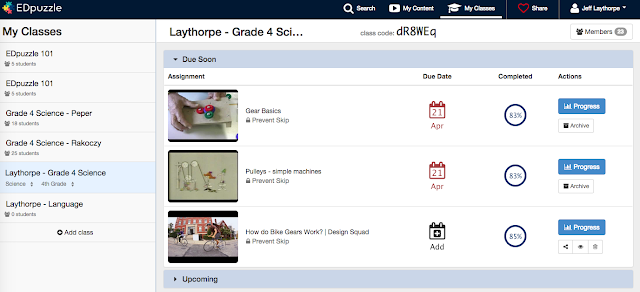
This is what the main screen looks like when your students enter the classroom they are in. As you can see the videos are listed on the side. They also can see the due date. The completed and actions page only show up on your version as the classroom teacher. This is where you can go and find out how are students are scoring on the videos or even their progress. 
Now where can you find the video you might possibly want to use to edit and share with your class. Well, if you click on the Search screen this is what you get. Notice all off the different sites you can get videos from. You can also even upload videos from your own personal camera. There is also a great database of publicly shared videos from other EDpuzzle users. Once you find the video you want to use then you just need to click on the Create button at the bottom of this screen.

This is an example of some of the content that I've created for my science classes. As you can see the videos I've made are no longer than 6 minutes. You can make them as long as you deem necessary. When your done with your videos you can click on the assign/share button. This is where I could use the same video for all my class sections of science, which made life pretty easy.
When your students click on the video they are watching this is what they will see. The video and the question marks below. Each one of those question marks are where I placed questions about the video or other things we have learned in connection to the video topic. You can add a nice little feature to the video where it prevents the students from skipping the questions. So if little Timmy wants to try and say yeah I did my homework and decided to go and play Minecraft instead the video will actually stop at that particular question. So can turn around and see that it might have taken Timmy close to 5 hours to complete the video or that particular question and then take it from there.
Here is an example of what a question can look like. You can make it multiple choice as well or have other variations of how students answer the questions.
As you can see EDpuzzle has some great features to help engage your class and also allow you some great ways to introduce tech into your classroom. I can honestly say it has been an amazing resource in how I've done things in my classroom. This is sort of how I think my students see me now after using EDpuzzle......Ok maybe not


Tuesday, 4 August 2015

Do You EDpuzzle?

We are just about a month away from being back in the classroom. I know groan! For some of you eager Beavers you are probably starting to prepare for the coming school year and thinking about what kind of new things you can bring to the room to excite and engage your students. Well, here is a great tool if you haven't discovered it already and it's called EDpuzzle. (seriously they have the best ads on Twitter)


EDpuzzle is a great tool for bringing engagement in and out of the classroom. Best of all it's FREE! I first discovered EDpuzzle when I attended a talk by Kevin Brookhouser who talked about the concept of flipped classrooms. If your are wondering what flipped classrooms are here is a great post describing it much better then I ever could possibly. It is a new trend starting to develop and I think it has some great merit.

When I learned about EDpuzzle I quickly created  an account and thought about how I could use it with my classes. At the time I was teaching three different sections of grade 4 science and it worked marvellously. With ED puzzle you can


take already existing videos through Google, Youtube, Vimeo or any other video site and make them apply to your classroom and the content you are teaching. One of the great things is that you can control the video be shortening, recording your own voice over it, inserting your own questions or even make it as an assessment. Here is the beauty of it. Any answer the student completes it automatically comes to you and you can mark it or already have the answers inserted into the video so your students get INSTANT FEEDBACK! I know wow right.

I used it with as a great test review and also as some homework and discussion starters in my class. I allowed students to access it in class with the use of Chromebooks or when we are where in the computer lab. The results where magnificent and led to success with many of my students that often struggled with pen and paper tasks. It was the differentiated instruction that they desperately needed. I saw confidence grow in students that I never saw before.
I would highly suggest getting familiar with this amazing tool. Give them a follow on a twitter as well as they have great tweets about all the cool things going on with their great site. 

Friday, 24 April 2015

Friday News


I hope everyone had a great week like us. One of my students had a brush with greatness which was very exciting to be a part of. So let's take a look at some of the stuff that took place this week.

So I teach three different sections of grade 4 science. I was looking for some new ways to get some assessments for the classes. I came across a great site called EDpuzzle. On this site you can set up a classroom very similar to Google Classroom. Then you can place a video where the class and students can go in and watch them and then answer questions you make up for them on the video. The best part is that you can totally alter the video so you can make it shorter or even add your own voice over videos that might not be in english. It's a clever little site that I am excited to explore some more. 
Back in January I challenged my students to write a letter to someone who inspired them. It was a great way to practice the skill of letter writing. Many of my students picked a variety of people and of course we saw the typical selections like Taylor Swift, One Direction, and Demi Lovato. Some of the kids are starting to get responses from the people they selected. One of our students got a package from author Robert Munch two weeks ago. However, this week we got one of the coolest packages in our classroom from our famous people. In my mail slot I had this really long envelope that clearly stated not to bend. I wasn't sure what was in their but I flipped it over to be stunned at who it was from. I took it up to the classroom immediately and showed the student who it was addressed to. Instantly, there was a grin from ear to ear and course an excessive amount of jumping. Which is funny because the person she wrote to is known for his jumping ability. Her famous person was NBA great Michael Jordan. Well here is the picture of what his "Airness" sent to my grade 3 student. 


Yeah that is signed!!! So cool!!! I was one extremely jealous teacher. 

Finally I've been working on Non-Fiction writing with my students for the past few weeks and created an assignment around the great "I Survived" book series. The series is based on real historical events but tells a fictional story in relation to the real events. My students have been absolutely hooked. They have no finished reading their selected books which they partner read. Now they are working on researching the actual event then creating an interactive Google Slides presentation. Here are some great photos of them working together. 


How did your week go?