Showing posts with label EdTech. Show all posts

Wednesday, 5 August 2015

Teach Me How To EDpuzzle

Yesterday, we talked about a great site and teaching tool called EDpuzzle. If you remember or don't remember EDpuzzle is a video site where you can add a class and have video content on there to engage your students in a different way of learning. Or as the fine folks over at EDpuzzle like to call it gaining super powers sort of like the video game character below.


Today, we are going to show you how easy it is to use EDpuzzle. Hopefully, it will show how easy this tool can be to use and also maybe inspire you to give it a shot. 
On
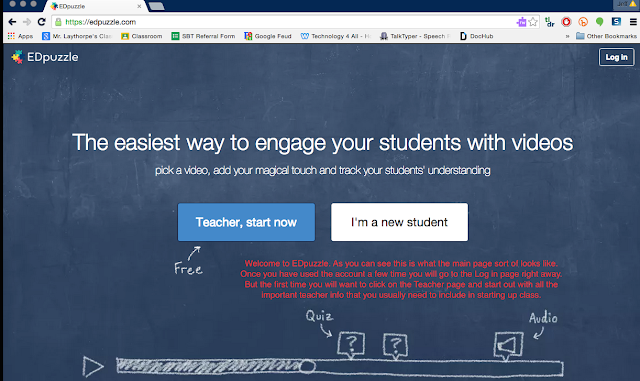
This is of course the first page you will see when you click on EDpuzzle for the first time. Pretty self explanatory here. As a teacher signing up for the first time you will click on the Teacher box. This will then take you to a screen that will ask you to put in your key details. You know the basic credentials like teacher name, email, etc. For your students they would follow the student login in. However, before you have them sign in you will need a course code so make sure you fill out your account info first and set up a classroom.

This is what your students will see when they click on the student page. 

Again this is more info your students will see when they click on the new student page. 

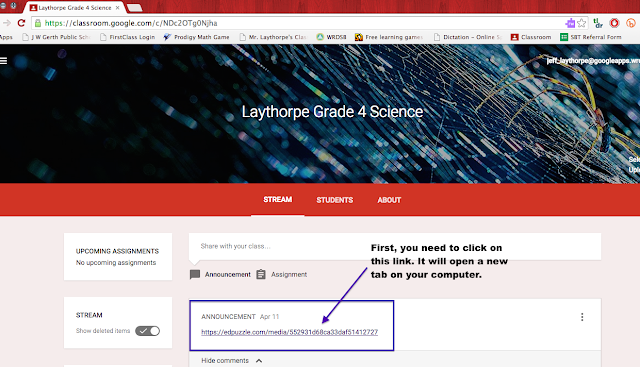
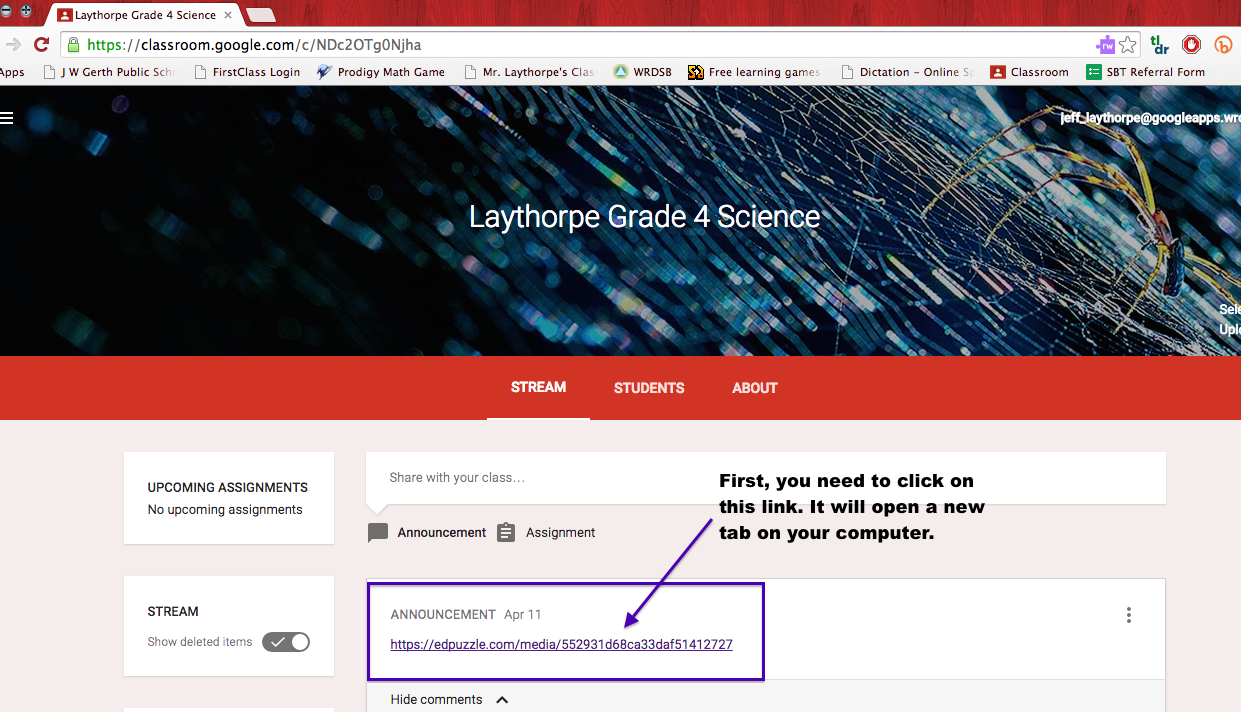
Now one suggestion if you are comfortable with tech and you use Google Classroom you can put the link to EDpuzzle and your videos up on Google Classroom as an announcement. This way your students can see the link instantly it directs them right to the video. Of course, you would need to be setup on Google Classroom or whatever other tech site you might use to connect with your students. This is a shot from my previous grade 4 science class just to show you what that might look like. 
When you enter in all your info and create a class EDpuzzle will give you a class code right away. As you can see in the picture below. Your students will need that code to enter the classroom and access the videos in that particular class. For me I had three different science classes so you can see my classes are broken up into sections. You of course do not need to do so. It was just easier for organization purposes. With the class code be sure to share this with class. Again it can be done whatever way you want. I put it up on the white board for students to record into their planners and they entered it when they got home. Other classes I posted it in our on our Google Classroom feed.
This is what the main screen looks like when your students enter the classroom they are in. As you can see the videos are listed on the side. They also can see the due date. The completed and actions page only show up on your version as the classroom teacher. This is where you can go and find out how are students are scoring on the videos or even their progress. 

Now where can you find the video you might possibly want to use to edit and share with your class. Well, if you click on the Search screen this is what you get. Notice all off the different sites you can get videos from. You can also even upload videos from your own personal camera. There is also a great database of publicly shared videos from other EDpuzzle users. Once you find the video you want to use then you just need to click on the Create button at the bottom of this screen.

This is an example of some of the content that I've created for my science classes. As you can see the videos I've made are no longer than 6 minutes. You can make them as long as you deem necessary. When your done with your videos you can click on the assign/share button. This is where I could use the same video for all my class sections of science, which made life pretty easy.
When your students click on the video they are watching this is what they will see. The video and the question marks below. Each one of those question marks are where I placed questions about the video or other things we have learned in connection to the video topic. You can add a nice little feature to the video where it prevents the students from skipping the questions. So if little Timmy wants to try and say yeah I did my homework and decided to go and play Minecraft instead the video will actually stop at that particular question. So can turn around and see that it might have taken Timmy close to 5 hours to complete the video or that particular question and then take it from there.
Here is an example of what a question can look like. You can make it multiple choice as well or have other variations of how students answer the questions.
As you can see EDpuzzle has some great features to help engage your class and also allow you some great ways to introduce tech into your classroom. I can honestly say it has been an amazing resource in how I've done things in my classroom. This is sort of how I think my students see me now after using EDpuzzle......Ok maybe not


Tuesday, 4 August 2015

Do You EDpuzzle?

We are just about a month away from being back in the classroom. I know groan! For some of you eager Beavers you are probably starting to prepare for the coming school year and thinking about what kind of new things you can bring to the room to excite and engage your students. Well, here is a great tool if you haven't discovered it already and it's called EDpuzzle. (seriously they have the best ads on Twitter)


EDpuzzle is a great tool for bringing engagement in and out of the classroom. Best of all it's FREE! I first discovered EDpuzzle when I attended a talk by Kevin Brookhouser who talked about the concept of flipped classrooms. If your are wondering what flipped classrooms are here is a great post describing it much better then I ever could possibly. It is a new trend starting to develop and I think it has some great merit.

When I learned about EDpuzzle I quickly created  an account and thought about how I could use it with my classes. At the time I was teaching three different sections of grade 4 science and it worked marvellously. With ED puzzle you can


take already existing videos through Google, Youtube, Vimeo or any other video site and make them apply to your classroom and the content you are teaching. One of the great things is that you can control the video be shortening, recording your own voice over it, inserting your own questions or even make it as an assessment. Here is the beauty of it. Any answer the student completes it automatically comes to you and you can mark it or already have the answers inserted into the video so your students get INSTANT FEEDBACK! I know wow right.

I used it with as a great test review and also as some homework and discussion starters in my class. I allowed students to access it in class with the use of Chromebooks or when we are where in the computer lab. The results where magnificent and led to success with many of my students that often struggled with pen and paper tasks. It was the differentiated instruction that they desperately needed. I saw confidence grow in students that I never saw before.
I would highly suggest getting familiar with this amazing tool. Give them a follow on a twitter as well as they have great tweets about all the cool things going on with their great site. 

Friday, 17 April 2015

Friday's News


In our next of the woods we had a four day week thanks to a PD day. However, like every four day week it was jam packed with lots of things.

Last weekend, Jeff attended the Google Apps for Education summit in town. There was over 900 educators who also attended the amazing event. The guest speakers who came to present came from all over the place and their ideas of how to implement EdTech in the classroom was simply amazing. Jeff attempted to successfully implement one new thing a day this week(come back next week to see some of the cool things he did)
Jeff also started his grade 4 science unit on Pulleys and Gears. Some of the things included giving the students a perspective of how gears work by travelling around a race track with an F1 car as it changes through high speeds and its gears. The kids loved it.

The kids also had a chance to recreate a water well after watching some villagers in Peru who made one for $35 with materials they found around the village. However, I supplied the materials for the kids and gave them price values for the materials they could buy. Here are some of the samples of what they produced. 
Here is a video of one group's attempt

Finally, in Jeff's class he showed them a great presentation on Growth Mindset, challenging them to try and always push themselves and not take the easy way out of things. His student all came up with things that have "YET" to accomplish and then they placed them all on the wall to see. His students are now working towards trying to complete these goals. They are also learning celebrate their mistakes.

How was your week?


Monday, 13 April 2015

My Weekend with "The Google"

I am going to apologize up front for the length of this post but I had an "a-ha" moment this weekend. Well, not really an "a-ha" moment that we speak of that we want to see in our students but more of a "Holy crap, this is AWESOME" sort of moment this past weekend when I attended the 3rd Google Apps for Education(also known as GAfE for those in the know) summit in Kitchener, Ontario. I will tell you if you get a chance to ever attend it is a MUST!

I have to admit at first when I first sat down with someone and had a chat about GAfE outside of a school setting I told her that she was crazy. I said "it's a fad and will be out the door before it even gets going" Well here I am swallowing the proverbial crow. Sorry Secondgradealicious you where right and I was wrong. GAfE is here to stay and I am so happy for it. Attending the summit this weekend I got a great chance to collaborate and speak with so many others around the province as to how effective this is and going to change the way we teach in the future.

The weekend started out in a high school gymnasium full of energy and excitement to learn. Either that or there was an excessive amount of coffee served before the show got started. Being at a teaching conference that is entirely possible. There was #hashtags flying around like snow on a January day in Ontario(last snow joke of the year). You could tell the day was going to rock.

Throughout the weekend I attended 8 jam packed sessions. Saturday, I had the privilege to sit in on sessions such as flipping the classroom with videos produced with EDpuzzle(check this site out. These guys are onto something). Then it was onto something that I've come accustomed to this year and that is using GAfE for students with exceptionalities. Part of my teaching role this year is in Special Education and having students use Chromebooks and GAfE to help them in their daily work. After lunch, did I mention the lunch? It was good. Isn't a free lunch always good though? We discussed the how to create interactive presentations through Google Slides. This one I was excited about because it was a great presentation to change the mundane presentations that we've all seen through our careers. I might even use it for staff meetings :). Finally, I attended a session on Google Classroom. Another program I've become quite familiar with as I've been using it for the past year and love it almost as much as my students do.


Saturday ended with a bang though with my first ever experience with a demo slam. If your ever asked to attend a demo slam say "YES". While my description might make you think "meh..so what" you need to go for yourself and make your own decision. It consisted of 12 Google "groupies" ok they where special instructors really, showing us their best demo of something fun in the span of three minutes. It introduced me to the world of youtubepure (its youtube, without the annoying ads about how you can become a super huge bodybuilder)
or how about "Let me Google that for you" a great site to pass along to all those people who see you using a computer or EdTech and saying "oh how do I do....." well this site is sort of cheeky way to say here this is how you do it.


Sunday, started out with the same level excitement as Saturday. Did I mention the excessive amount of coffee? The morning made me so excited because Kevin Brookhouser was the keynote speaker and he was amazing. I became sort of a fan-boy of this man and not in the crazy obsessive way. I've visited his site 15 times in the past two days, that's normal right? He talked about the need to tap into creating education for human consumption. Check out his 20time project. Amazing stuff! Oh 16 times now.

After listening to Kevin speak I wanted to learn how to better use another very cool tool in Google Forms. I was able to create a spreadsheet and form that automatically sent emails from me to parents of students and it kept track of all the details to have a full detailed history of all our communications. From there it was listening to an amazing teacher who is using GAfE in his grade 2 class. Yes, even grade 2 students are excelling with this amazing tool. Love it! From there it was back to the free lunch table. hmmmm free lunch. I also sat in a breakout meeting with some Google experts. Sort of like having lunch with the rock stars of the summit. After I spent two sessions on how to use Google to collaborate with other teachers not just in my school but around the world. YES the world, going global people! Talk about a great way to expose our students to things you can't learn in a text book. Bring the actual people into your classroom through Google Hangouts.


All in all it was an amazing weekend. I learned so much in just two days that I am so excited to introduce to my staff and classroom. Most of all I am excited to try it with those that matter most. My students! At the end of the weekend I sort of felt like this, but in a good way.